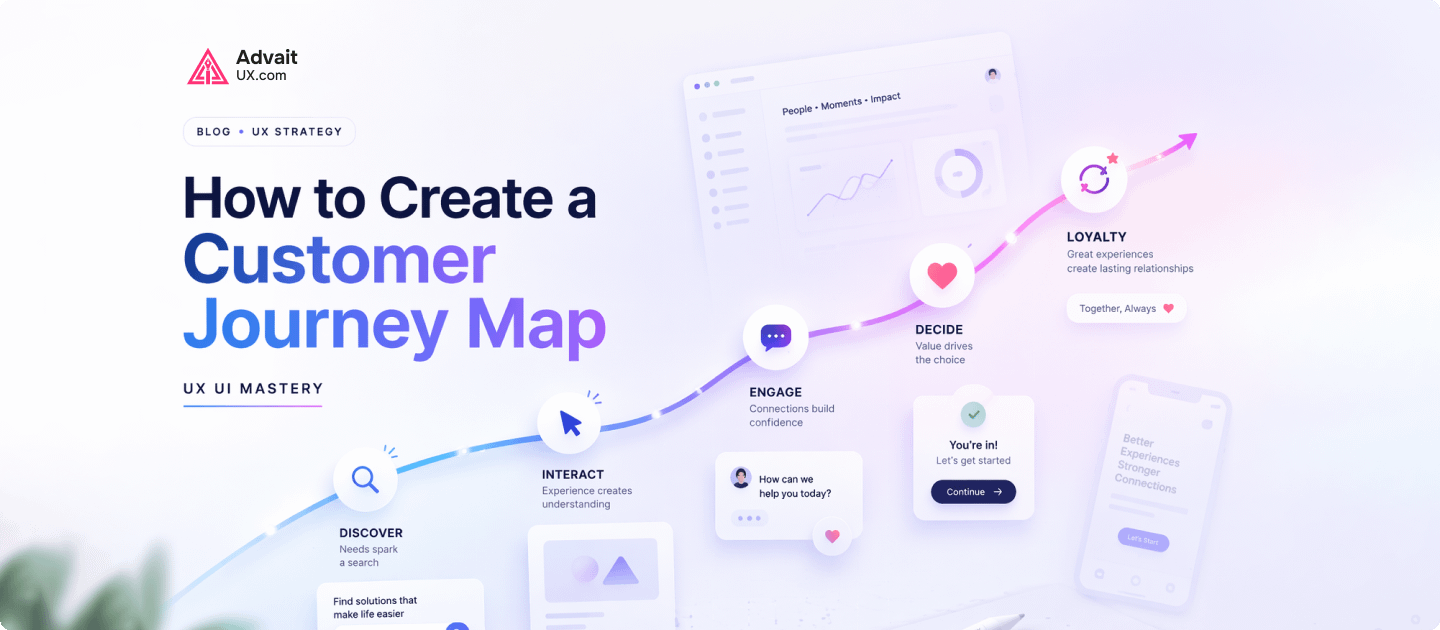
Short answer: A customer journey map visualises every step a user takes to reach a goal with your product — actions, thoughts, emotions, and pain points at each stage. Built from research (interviews, support tickets, analytics), it reveals friction that dashboards miss and aligns teams on where to invest design effort. (Further reading: NN/g — customer journey mapping 101.)
📅 Last updated: June 6, 2026
⏱ 7 min read · 1,573 words
Related reading: see what happens during a UX design audit and advanced UX research methods. Want help applying this to your product? Explore our UI/UX design services.
Customer journey mapping is one of the most effective ways to understand how users interact with a digital product. It helps businesses see the complete experience from the user’s perspective, including their actions, emotions, frustrations, and goals.
Modern businesses investing in UI and UX Design Services use customer journey mapping to improve usability, engagement, and conversions. A well-planned journey map helps teams build products that are easier to use and more aligned with customer expectations.
What Is a Customer Journey Map?
A customer journey map is a visual representation of how users interact with a website, app, or digital service over time. It tracks each stage of the UX UI user experience, from initial discovery to final conversion and even post-purchase interactions.
In simple terms, customer journey mapping helps businesses understand what users experience, what they expect, and where they face difficulties. This process allows companies to improve the overall UX UI user experience and create smoother digital interactions.
Professional UI UX Design Services use customer journey maps to identify usability gaps before development costs increase.
Why Customer Journey Mapping Matters in UX Design
Many businesses focus heavily on visuals while ignoring how users actually move through a product. A visually attractive website may still fail if users feel confused or frustrated during navigation.
Customer journey mapping improves UX UI design by helping teams understand real user behavior. It reveals friction points, identifies opportunities for improvement, and creates a more user-centered design strategy.
When businesses understand the customer journey, they can improve navigation clarity, reduce user frustration, and create better conversion flows.
According to Nielsen Norman Group, customer journey maps help organizations align design decisions with real user needs.
When Should You Create a Customer Journey Map?
Customer journey mapping should begin early in the design process. It is especially useful before designing interfaces or starting development.
Businesses commonly create journey maps when launching a new website, redesigning an existing product, improving low conversion rates, or solving usability issues. It is also valuable when expanding digital products or adding new features.
A strong journey map creates clarity before design decisions are finalized.
Who Uses Customer Journey Maps?
Customer journey maps are useful for UX UI designers, developers, product managers, marketing teams, and business stakeholders. Since user experience affects every part of a digital product, multiple teams benefit from understanding the customer journey.
At AdvaitUX, customer journey mapping often becomes part of early UX UI strategy workshops. This collaborative process helps teams align business goals with real user expectations.
Step 1: Understand Your Users
The first step in customer journey mapping is identifying the target audience. Businesses must understand who the users are, what they need, and what challenges they face.
User research usually includes interviews, behavioral analysis, surveys, and usability testing. This research helps create realistic user personas that guide UX UI decisions throughout the project.
Strong UI UX Design Website Solutions are always based on real user behaviour rather than assumptions.
Step 2: Define the User’s Goal
Every customer journey starts with a purpose. Users visit websites or applications because they want to solve a problem or complete a task.
Some UX UI users want to purchase a product, while others want information, support, or access to a service. Defining this goal clearly helps structure the journey more effectively.
Without understanding user intent, even visually polished UI UX design experiences can feel disconnected.
Step 3: Identify User Touchpoints
Touchpoints are all the moments where users interact with your brand or digital product. These interactions may happen through search engines, landing pages, mobile apps, email campaigns, product pages, or customer support systems.
Identifying touchpoints helps businesses understand how users move between platforms and channels. It also reveals where users encounter friction or confusion.
Modern ui ux design strategies focus on creating consistency across every touchpoint.
Step 4: Map User Actions and Behavior
Once touchpoints are identified, the next step is mapping user actions. This includes documenting what users do at each stage of the journey.
For example, users may search for information, compare options, explore product pages, complete forms, or make purchases. Tracking these actions reveals patterns in user behavior.
This process helps UX UI teams understand where users succeed and where they struggle.
Step 5: Understand User Emotions
A customer journey map should also include emotional insights. User experience is not only functional but emotional as well.
Users may feel excited when discovering a product but frustrated when navigation becomes unclear. They may feel confident during onboarding or confused during checkout.
Understanding emotional reactions helps businesses improve interface usability and reduce friction throughout the journey.
You can explore emotional UX principles further through Interaction Design Foundation.
Step 6: Identify Pain Points
Pain points are obstacles that interrupt the user experience. These problems often prevent users from completing their goals efficiently.
Common issues include unclear navigation, slow-loading pages, complicated forms, poor mobile responsiveness, or confusing calls to action.
At AdvaitUX, usability testing frequently reveals friction points that internal teams overlook. Addressing these issues early improves both customer satisfaction and business performance.
Step 7: Discover Opportunities for Improvement
Once pain points are identified, businesses can explore opportunities to improve the experience.
Small UX UI improvements often create significant results. Simplifying navigation, improving onboarding flows, reducing unnecessary steps, and clarifying content structure can dramatically improve usability.
Professional UI and UX Design Services focus on reducing user effort while improving engagement and accessibility.
Step 8: Visualize the Entire Journey
The final customer journey map should clearly show the complete experience from beginning to end. It should include user stages, actions, emotions, challenges, and opportunities.
The purpose of the journey map is to create a shared understanding across teams. This alignment helps businesses make more informed UX decisions.
A well-structured journey map also supports long-term product strategy and scalability.
Common Mistakes in Customer Journey Mapping
One of the biggest mistakes businesses make is relying on assumptions instead of real user research. Without accurate insights, journey maps become unreliable.
Another common issue is focusing only on desktop experiences while ignoring mobile users. Modern users interact across multiple devices, so responsive experiences are essential.
Some businesses also treat customer journey maps as one-time activities. In reality, user behavior evolves over time, and journey maps should be updated regularly.
How Customer Journey Mapping Improves Business Growth
Customer journey mapping benefits both users and businesses. It helps improve usability, increase conversions, strengthen customer trust, and reduce support requests.
When businesses understand how users think and behave, they create more effective digital experiences. Better experiences often lead to stronger retention and long-term growth.
This is why many successful brands invest heavily in research-driven UI UX design strategies.
Real UX Insight from Practical Experience
From real-world UX UI projects, one insight consistently stands out: users value clarity more than complexity.
Many businesses assume adding more features improves the product experience. However, users usually prefer simple navigation, faster workflows, and intuitive interactions.
At AdvaitUX, customer journey mapping regularly uncovers hidden usability problems that analytics alone cannot explain. In many cases, improving a few key user flows creates major improvements in engagement and conversions.
Why Businesses Choose AdvaitUX
AdvaitUX is a research-driven UX UI agency focused on usability, clarity, and scalable digital experiences. The team combines strategic thinking with practical UX UI execution to create products that solve real user problems.
Businesses choose AdvaitUX because of its focus on user-centered design, usability testing, accessibility, and long-term UX UI strategy.
Explore professional ui ux design services designed for websites, SaaS platforms, and modern digital products.
Final Thoughts on Customer Journey Mapping
Customer journey mapping is not just a UX exercise. It is a strategic process that helps businesses understand users more effectively.
A strong customer journey map reveals what UX UI users need, where they struggle, and how digital experiences can improve. These insights lead to smarter UI UX design decisions and more successful digital products.
Businesses that prioritize customer journeys create experiences that feel intuitive, efficient, and valuable.
Work with a UX Team That Understands Real User Behavior
If you want to improve your website, application, or digital product with research-driven UX strategy, AdvaitUX can help.
Visit AdvaitUX.com to explore professional UI and UX design services and connect with experts focused on usability, engagement, and long-term product growth.
💡 Working on your own product? Start with a structured UX audit to surface the highest-impact friction in 1–3 weeks, or get in touch to scope a project with our Austin-based team. You can also see our recent UI/UX projects for examples.
Frequently Asked Questions
What is a customer journey map?
A customer journey map is a visual representation of every step a user takes to achieve a goal with your product — including actions, thoughts, emotions, and pain points at each stage. It reveals friction the analytics dashboard can’t.
How do you create a customer journey map?
Start with research (interviews, support tickets, analytics), define personas and goals, list every touchpoint, then map actions, motivations, and emotions across stages. Validate with real users before acting on insights.
About the Author
Darshan Italiya is the Founder & UX Lead at AdvaitUX, a UI/UX design agency based in Austin, TX. A Google-certified UI designer with 7+ years of experience and 70+ shipped product designs, he writes about user-centered design, UX strategy, and conversion-focused interfaces. Learn more about AdvaitUX or connect on LinkedIn.